Managing Your Subscriptions
Your API.Bible subscription is managed through your Dashboard. This article covers the actions available to you — changing your plan, managing Bible licenses, updating your payment method, and viewing your invoices. For information on how billing adjusts when you make changes, see How Billing Works After Subscription Changes.
One Subscription Per App
Each application in your account has its own independent subscription. If you have multiple apps, you'll need to manage each one separately from the Dashboard.
What's in the Dashboard
Your Dashboard is organized into three tabs:
- Dashboard — an overview of your current usage: your active plan, current API call count versus your plan limit, your next usage reset date, and a usage graph you can filter by time range.
- Plan — manage your subscription plan and Bible license add-ons.
- Settings — update your payment method, view invoices, manage your API key and endpoint, and access account configuration options including cancellation.
Changing Your Plan
You can upgrade or downgrade your plan from the Plan tab of your Dashboard with the buttons Upgrade to Pro Plan or Cancel Plan. (You can also upgrade directly from the Dashboard tab using the Upgrade Plan button on the Plan card.)
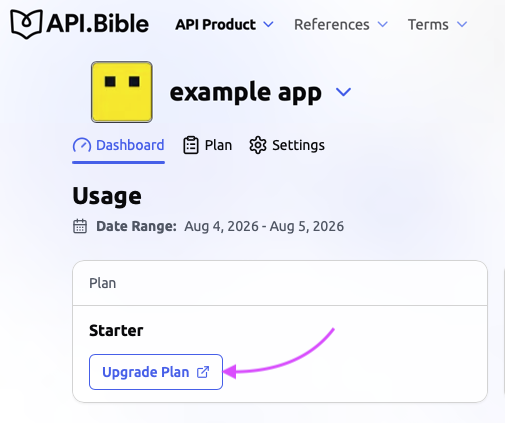
Note that upgrades take effect immediately, while downgrades take effect at the start of your next billing cycle. For a full explanation of how billing adjusts, see How Billing Works After Subscription Changes.
For a comparison of what each plan includes, see Comparing API.Bible Plans.
Managing Bible Licenses
Bible licenses are managed from the Plan tab of your Dashboard. You can add or remove licensed translations at any time. Added licenses are available immediately; removed licenses remain active through the end of your current billing month and won't renew after that.

Updating Your Payment Method
Your payment method is managed in the Plan tab of your Dashboard. If a payment fails and your app shows a Pending Payment or Unpaid status, updating your payment method and retrying the charge will restore access.

Viewing Your Invoices
Past invoices are available in the Settings tab of your Dashboard. Each invoice reflects your base plan fee, any Bible license add-ons, and any overage charges incurred during that period.
Cancel Plan
You can cancel a subscription from the Plan tab of your Dashboard. Before you do, see What Happens if I Cancel My Plan? — cancellation has consequences for your API access and Bible licenses that are worth understanding first.

Reactivating a Canceled Subscription
Canceled subscriptions cannot be reactivated. If you want to use API.Bible again after canceling, you will need to create a new app in your account and subscribe from there.